Lobbies
One icon per lobby with its count and state, the page arrows, colouring by load, and hiding locked lobbies.
/lobby or the hotbar tool, node uxmmultilobby.use. Three rows.
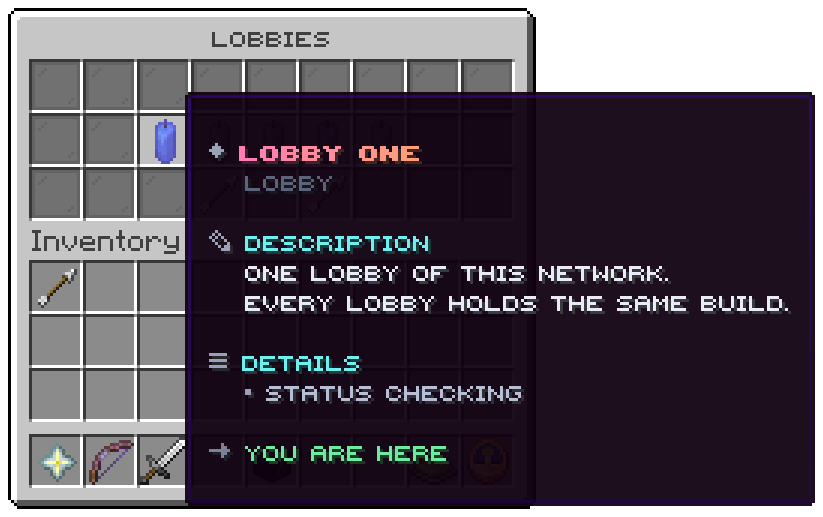
| Slot | Holds | Click |
|---|---|---|
| 10 to 16 | One icon per lobby, at the slot its block names; the lobby you are on glows | Joins it, or says why not |
| 21 | An arrow | The previous page |
| 23 | An arrow | The next page |
The shipped five lobbies sit in 11 to 15, the middle of the row.
A lobby's tooltip
| Part | Shows |
|---|---|
| Title | The lobby's name, in its colour |
| Players | <players> of <maximum>; left out for a lobby that has told nothing yet |
| Status | Online, Full, Offline, or Checking before the first answer |
| The closing line | Click to join it, You are here, You may not join this lobby, This lobby is full, This lobby is not answering or Waiting for the first answer |
The picture is from a development lobby with one server running, so the others are still checking, and it colours lobbies by load.
Colouring by load
The shipped window draws each lobby with its own icon. Write material = "%lobby_load_icon%" in
menus/lobbies.conf to colour every lobby by how full it is instead:
| Load | When | Material (menu.load-icons) |
|---|---|---|
current | The lobby the player is on | BLUE_CANDLE |
open | It answered and has room | LIME_CANDLE |
busy | It holds at least menu.busy-at-percent (50) of its maximum | YELLOW_CANDLE |
full | It is at its maximum | RED_CANDLE |
closed | Offline, or not heard from since the server started | GRAY_CANDLE |
%lobby_load% is the word itself, for a lore line.
Locked lobbies
A lobby with a permission the player lacks is shown locked. menu.hide-locked = true leaves it out instead: shown
locked advertises what a rank buys, left out keeps a staff lobby unseen.
The best-lobby button
The file carries a commented best button for slot 22 that runs lobby:best, the same as /quicklobby. Take the
hashes off to switch it on.
Related: Menu file, Live counts
Was this page helpful?