Calendar window
The calendar window slot by slot, the four states of a day, the icons, and the streak tile.
/dailyrewards opens the calendar: six rows, one tile per day, the streak at the bottom.
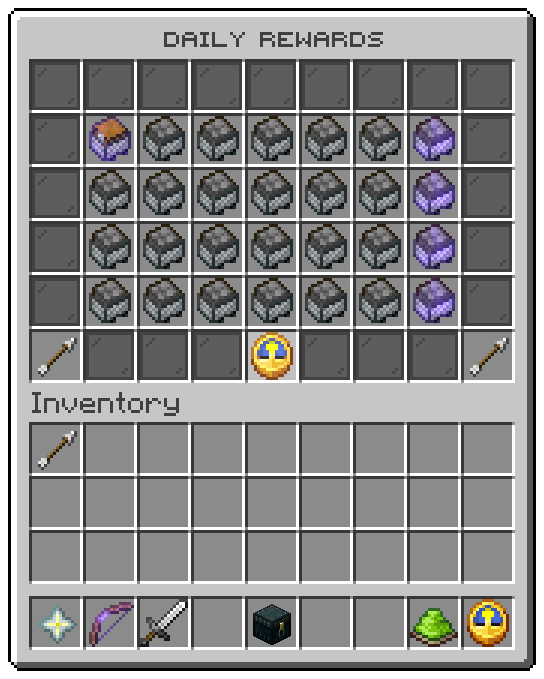
The screenshots are from a lobby with its own day files, paying coins; the tables below describe the shipped
menus/calendar.conf and days/.
Slots
| Slot | Tile | Click |
|---|---|---|
| 10 to 16, 19 to 25, 28 to 34, 37 to 43 | One day each, 28 to a page | Left click on the ready day claims it; any other day refuses with the denied sound |
| 45 | Previous page | Turns back a page, when the calendar is longer than 28 days |
| 49 | Your streak | Nothing |
| 53 | Next page | Turns forward a page |
| Every other slot | Grey pane | Nothing |
A claim from the window answers in chat as /dailyrewards claim does, then draws the window again with the new
states.
A day
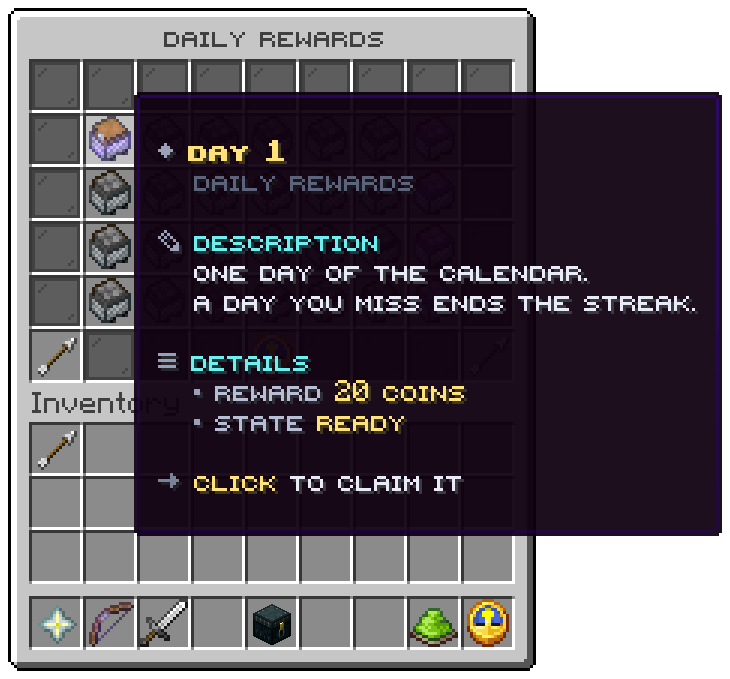
| Line | From |
|---|---|
| Title | menu.day.title: Day <day>, in the colour of the day's state |
| Crumb | menu.day.crumb: Daily rewards |
| Description | menu.day.description: One day of the calendar. A day you miss ends the streak. |
| Reward | What the day gives at the viewer's rank, see below |
| State | menu.day.state-<state>: Ready, Next up, Taken or Not yet |
| Click line | menu.day.action-<state> |
The four states
| State | Shown when | Icon (icon-<state>) | Title colour (role-<state>) | Click line |
|---|---|---|---|---|
claimable | The day the player may claim now | CHEST_MINECART, glowing | cta | Click to claim it |
waiting | The next day, while the window runs | COMMAND_BLOCK_MINECART | info | Come back when the wait is over |
claimed | A day taken in this round | MINECART | good | You have taken this day |
locked | Any later day, or every day after the streak ran out | FURNACE_MINECART | muted | Come back on this day |
Icons
The icon of each state is set under placeholders at the top of calendar.conf. With all four set, as shipped, a
day is drawn by its state and the day file's icon.material is not shown. Write an empty value, such as
icon-locked = "", to draw the days of that state with their own icon. icon.model-data and icon.glow of the day
file apply in every state.
The reward line
The reward line names what the day's lines give, at the viewer's rank:
| A line | Is named as | Key |
|---|---|---|
[console] give %player% <item> <amount> or [player] give ... | The amount and the item, in the viewer's client language | menu.day.reward.item |
[give-money] vault, vault-unlocked or treasury | <amount> coins | menu.day.reward.coins |
[give-money] exp | <amount> experience | menu.day.reward.experience |
[give-money] levels | <amount> levels | menu.day.reward.levels |
[give-money] playerpoints | <amount> points | menu.day.reward.points |
[give-money] ecobits:<currency> | <amount> <currency> | menu.day.reward.currency |
Parts are joined with menu.day.reward.separator. Any other line, a title or a crate key command, is not named. For
a day whose reward needs a sentence, write a line of its own under menu.day.rewards in every messages file:
menu {
  day {
    rewards {
      7 = "A rare crate key"
    }
  }
}
That line is shown instead of the named parts. A day that names nothing and has no line of its own shows no reward line.
Your streak
The clock in slot 49:
| Line | From |
|---|---|
| Title | menu.info.title: Your streak |
| Description | menu.info.description |
| Streak | The current streak; 0 once it has run out |
| Next reward | Waiting for you when a day is ready, else the time left, such as 23h 59m 41s |
| Click line | Click a day to claim it, or Come back when the time is up |
The time is the time when the window was drawn; it does not count down while the window stays open.
Related: Overview, The calendar, Menu files
Was this page helpful?