Arena editor
One arena, a row per piece, and the switch that opens it to players.
Opened by /uxmparkour edit <arena>, by /uxmparkour create <name>, and from the arena list. Layout:
menus/arena-editor.conf, five rows. The title names the arena.
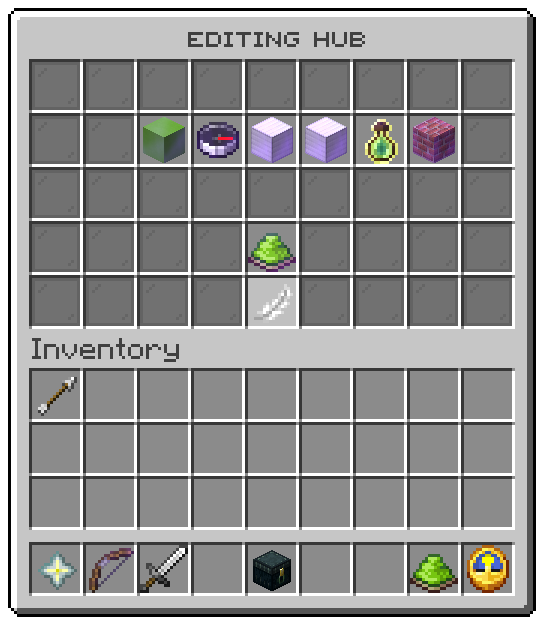
| Slot | Tile | Left click | Right click |
|---|---|---|---|
| 11 | Start block, lime concrete | Takes the block under your feet | Closes the window; the next block you click becomes the start |
| 12 | Heading, a compass | Takes the way you face, rounded to north, east, south or west | the same |
| 13 | Corner one, an iron block | Takes the block under your feet | Closes the window; the next block you click becomes the corner |
| 14 | Corner two, an iron block | Takes the block under your feet | Closes the window; the next block you click becomes the corner |
| 15 | Difficulty, a bottle o' enchanting | Steps to the next difficulty in config.conf | the same |
| 16 | Palette, bricks | Steps to the next theme in config.conf | the same |
| 31 | Open to players, a dye or a barrier | Opens the arena, or shuts it | |
| 40 | Back, a feather | Opens the arena list | |
| every other slot | Grey glass filler |
Each piece's tooltip shows what it holds now, or not set, and a set piece glows. After every click the editor opens again with the row filled in.
Marking a block from a distance
A right click on a position row closes the window and waits for one block. Left or right click any block in reach and it becomes that piece; the click is cancelled, so the block is not broken. Swinging at the air instead cancels the question and says so. Either way the editor opens again.
A block in another world than the arena's moves the arena to that world and drops its other positions, because a box spans one world.
The switch
| Arena | Switch | Click |
|---|---|---|
| Open | Lime dye, glowing | Shuts it, which ends every run on the server first |
| Shut, every piece set | Grey dye | Opens it, unless the start block is outside the box |
| A piece missing | Barrier, "Set every piece first" | Refused, naming the missing pieces |
Tokens
| Token | Value |
|---|---|
%editor_title% | The window title, naming the arena |
%piece% | The piece in the row: start, heading, corner1, corner2, difficulty, theme |
%piece_icon% | The icon-<piece> line |
%piece_set% | true once the piece is set |
%tile_piece% | The tooltip of a piece |
%arena_icon%, %arena_role%, %arena_open% | The switch's look by the arena's state, as in the list |
%tile_toggle% | The tooltip of the switch |
%tile_back% | The tooltip of Back |
Actions
| Action | Does |
|---|---|
parkour:set-piece | Takes where you stand, the way you look, or the next value |
parkour:pick-piece | Closes the window and waits for a block |
parkour:toggle-arena | Opens the arena or shuts it |
The six rows are laid into slots 11 to 16 in the order above; move the pieces slots to move all six. Swap
left and right in the file to make clicking a block the plain action.
Related: Your first arena, Arenas, Operator commands
Was this page helpful?