Flags
Turning the claim-wide rules on and off.
menu/claim_flags.yml, opened from claim management.
Every one of the 32 flags appears as an item showing its current state, over two pages. Clicking toggles it, and an active flag glows.
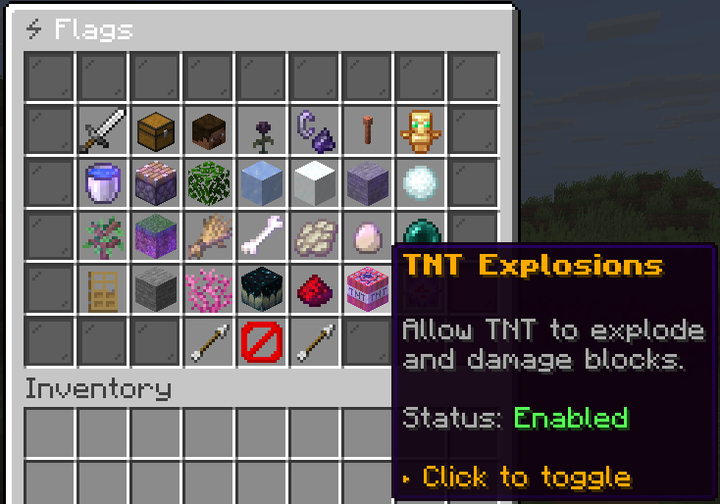
A flag being on means the thing is permitted. Turning FIRE_SPREAD off stops fire spreading;
turning it on lets it spread again.
Who can toggle
Only the claim owner, or a player with uxmclaims.admin. Each flag also needs its own ability node,
uxmclaims.ability.claim.flag.<flag> (for example …flag.keep_inventory), or …flag.* for all of
them. Flags you may not change are shown but refuse on click.
The per-flag nodes let you decide which flags owners tune themselves. Grant …flag.keep_inventory and
…flag.mob_spawning, and PVP stays a server decision.
The order on screen
The items fill itemSlots in this order, not by any slot key:
| Group | Flags |
|---|---|
| Security and damage | PVP, KEEP_INVENTORY, CREEPER_DAMAGE, WITHER_DAMAGE, FIRE_SPREAD, LIGHTNING_DAMAGE, MOB_GRIEFING |
| World mechanics | FLUID_FLOW, PISTON_PUSH, LEAF_DECAY, ICE_MELT, BLOCK_FADE, BLOCK_FORM, ENTITY_BLOCK_FORM, STRUCTURE_GROW, NATURE_SPREAD |
| Spawning | SPAWN_ANIMALS, SPAWN_MONSTERS, SPAWN_PHANTOMS, MOB_SPAWNING |
| Mob behaviour | ENDERMAN_PICKUP, ZOMBIE_DOOR_BREAK, SILVERFISH_INFEST |
| Blocks | CORAL_FADE, SCULK_SPREAD, REDSTONE |
| Explosions | TNT_EXPLOSIONS, END_CRYSTAL_DAMAGE, BED_EXPLOSION, FIREBALL_DAMAGE, DRAGON_DAMAGE, RESPAWN_ANCHOR_EXPLOSION |
Each flag's item is keyed by its name in camelCase, such as fireSpread. The state text comes from
statusActive and statusPassive in messages.yml.
Two that surprise people
MOB_SPAWNINGis a master switch. Off, nothing spawns naturally regardless of the three specific spawn flags. A player turning it off to stop creepers also stops their cow farm.REDSTONEoff breaks farms. It stops redstone current entirely, which is heavier than most players expect from the name.
Was this page helpful?